 Tech tips for French class
Helpful tips on implementation of technology in the Foreign Language classroom. Bon appetit!

15 Saturday Dec 2012
Tech tips for French class
Helpful tips on implementation of technology in the Foreign Language classroom. Bon appetit!
14 Friday Dec 2012
Posted in EDUC 630
Tags
Click on the link to view the plan:
13 Thursday Dec 2012
Posted in EDUC 638
Tags
13 Thursday Dec 2012
Posted in EDUC 629
Click on this link to view the Plan:
Technology Implementation Plan
Imaginary County
Public Schools
Educational Technology Plan 2011-2016
Table of Contents
Vision, Mission, and Goals…..……………………………………………………………………………………….. 1
Needs Assessment …………………………………………………………………………………………………….…… 5
The Planning Process ………………………………………………………………………………………………….. 10
State Goals and Objectives with Local Strategies and Measures …………….……………… 10
Environment ………………………………………………………………………………………….. 14
Engagement ……………………………………………………………………………………………… 14
Application …………………………………………………………………………………………….. 15
Tools ………………………………………………………………………………………………….……… 15
Results ………………………………………………………………………………………………….. 17
Implementation: Timetable and Budget for Goals, Objectives and Strategies …….. 18
Sample Lesson Plans…………………………………………………………………………………………………………………….. 26
Executive Summary …………………………………………………………………………………………………………………….…….. 31
Vision, Mission, and Goals of Imaginary County Public Schools
Vision
All county residents will have the potential to possess the knowledge, skills, attitudes, and abilities necessary to achieve continuous growth throughout the County.
Mission
District leaders and schools will develop and implement programs designed to coordinate with state and national standards and benchmarks, identify needs, provide technical assistance, and assess performance for education and training providers based on high levels of student achievement, a safe learning environment and the continuous self-sufficiency of county residents.
Goals
1.0 Learning: Engage and Empower
All learners will have engaging and empowering learning experiences both in and out of school that prepare them to be active, creative, knowledgeable, and ethical participants in our globally networked society.
2.0 Assessment: Measure What Matters
Assessments will be designed to determine student preparedness for courses and overall student achievement. Our education system at all levels will leverage the power of technology to measure what matters and use assessment data for continuous improvement of programs and adaptation to student needs.
3.0 Teaching: Prepare and Connect
Professional educators will be supported individually and in teams by technology that connects them to data, content, resources, expertise, and learning experiences that enable and inspire more effective teaching for all learners.
4.0 Infrastructure: Access and Enable
All students and educators will have access to a comprehensive infrastructure and adaptive technology for learning when and where they need it.
5.0 Productivity: Redesign and Transform
The education system will design and redesign processes and structures to maximize the power of technology to improve learning outcomes for all involved while making more efficient use of time, money, and staff.
Needs Assessment
Strengths
Current strengths of technology use in the system include flexibility, current infrastructure and the use of technology by our students.
One of the greatest strengths of the use of technology in our schools is the flexibility these tools currently provide teachers and students. Teachers have the ability to provide instruction and assessments in digital format both in and out of school. Teachers are able to record critical components of their course, post them and offer them to students for review at any time. With access to technology, students are able to keep up with class assignments wherever they are.
Current infrastructure is adequate to most needs. Currently, students use computer labs and websites to complete assignments. Servers that are aging still provide access. The current systems will make upgrades easier and cheaper than installing completely new systems as we adopt new standards.
Our students are adept users of all kinds of technology. Smart phones, tablets, laptops are all familiar grounds for most students. Increased technology implementation may be started with the tools our students already use. Teachers already use these tools with classes where it makes sense to do so.
Weaknesses
Current weaknesses of technology use in the system include budgetary constraints, technology itself, teacher education, cultural concerns and parental inability to provide access.
The budget has been slow to respond to student needs in this area. As a result, the need for immediate funding is critical. Infrastructure upgrades, including servers and computers are needed to allow students and teachers to keep up with the speed required by modern applications.
Technology, itself, has not helped the problem. The ever-changing and improving nature of technology in the classroom means that as soon as a new system is implemented in the classroom, it is well on its way toward obsolescence. The haphazard method of implementation in the past has left schools with a smattering of different and incompatible systems and software that is of limited benefit or use to students and teachers.
Many teachers have not been adequately trained in the use of technology. Some of our best teachers have years of classroom experience. Unfortunately, there is a gap between these veterans and their new colleagues in the area of implementing technology in the classroom. This must be addressed if our students are to get the most out of their education.
Recent studies have shown that different groups of students use technology differently. While some groups of students use technology primarily for research and building understanding, other groups use the same tools for entertainment. These cultural differences must be addressed to ensure that students get the most out of the technology they are offered. This will help level the educational playing field for all of our students.
As the economy continues to weaken, more and more parents are finding it increasingly difficult to provide internet access to technology for their students. The lack of affordable options for parents in this area remains a significant challenge in the area of take-home assignments.
Opportunities
Future opportunities in the area of technology use in the classroom include greater opportunities for culture exploration, Socioeconomic de-stratification in the classroom, exposure, collaboration and greater inclusion for students with special needs.
Use of technology provides students with the opportunity to explore and interact with different cultures around the world in real time.
Application and use of technology by all students levels the academic playing field for students of all socioeconomic levels. Offering technology tools to all students allows for a more balanced educational experience by all students. Students who might otherwise be excluded from the research opportunities
Expanded use of technology in our educational system gives students exposure to the tools they will need in their future. Universities and employers are demanding greater levels of technological literacy and competence. Students benefit when they are prepared well. Exposure to technology tools means our students will remain competitive at the next level of their education.
One key to success for the student is the concept of self-directed learning. Use of technology will allow students to collaborate on work over long distances, thus allowing them to direct their understandings of complex issues and concepts to a much deeper level. Collaboration will allow them to bring to bear more assets to the process of developing understandings in their courses. This collaboration can and will include classmates and experts all over the world. This ability will keep our students on the cutting edge in education.
For students with special needs, technology offers a real opportunity for inclusion. One of the primary concerns for students with special needs is to prepare them with the life skills necessary to develop self-care abilities. As employers are demanding greater technological competence, special needs students are well served by developing these skill sets early. The classroom is an ideal setting for this development.
Threats
Threats to the implementation of the technology plan in our schools include money, the skill sets of teachers, wide variety of different platforms, parents’ inability or unwillingness to help their students adapt, and inappropriate use by students and teachers.
The first threat to the implementation and continued success of the technology plan in our schools is budgetary. Without the allocation of funds to support the implementation, maintenance and improvement of technology on an on-going basis, the plan will fail. Infrastructure, including servers, computers, software, teacher training and other facilities are costly. This cost is never going away. Continuous upgrade and expansion will be required to continue the progress of students and educators alike.
In technology, like any other area of education, ignorance is dangerous. Teachers need to be educated in the use of new hardware and software. Without this the technology will be wasted.
Technology, itself, can be a threat. The variety of platforms and tools can breed confusion and become counterproductive. Mac or PC, iPad or one of the myriad other tablets available must all be considered. These decisions can be impacted by budgetary considerations, but should not be the only deciding factor. User friendliness, flexibility and longevity should all be taken into account when deciding on a platform. The more uniform the standards are the more skill students will develop.
Parents are key in the implementation of educational technology. As parents value the use of technology, they can and will support the students’ use. Parents do not always have the ability to provide internet access the student will need to complete assignments at home. Socioeconomic considerations should be included in any successful technology plan.
Students and teachers need to be trained on what it means to be good digital students. Improper use of technology both in and out of class reduces productivity and should be discouraged. Students and teachers need to understand what proper and improper use of technology looks like. Vigilance and reinforcement of the proper use of technology on an ongoing basis will lead to success.
The Planning Process
State Goals and Objectives with Local Strategies and Measures
Objective: Student’s will develop skills to utilize technology as a tool in all areas of the curriculum.
Local Strategy: Encourage the use of ICT related tools in all areas of the curriculum.
Objective: Educators will be empowered to apply technology appropriately in their content area to enhance instruction.
Local Strategy: Provide tools and training including “best practices” sessions for teachers to share what works in incorporating ICT skills.
Objective: Educators will utilize technology to differentiate instruction to meet students’ needs.
Local Strategy: Teachers will apply tools like Edmodo and extension menus to differentiate outcomes of instruction.
Objective: The use of formative and summative assessments will be enhanced through technology.
Local Strategy: Schools will invest in the kinds of curricula that include technology-based assessments.
Objective: Students and educators will have access to mobile computers, digital devices and tool-based software that makes instruction relevant and powerful.
Local Strategy: Schools will assess what tools make the best fit for the needs of the students the curriculum, then grant access to these tools to students and staff
Objective: Internet access and bandwidth will be sufficient to meet instructional technology needs.
Local Strategy: Schools will assess the effectiveness of current infrastructure and make necessary changes to allow for student access with appropriate hardware.
Objective: Students and educators will have access to content that enhances instruction from around the world.
Local Strategy: Schools will establish relationships with sister schools around the world. Teachers will be instructed on the best use of cross-cultural connections in classroom instruction.
Objective: The results of student assessments and other student data will be made available in a useful format.
Local Strategy: The school will provide staff and teacher instruction on and implement and launch digital grade book software that will incorporate attendance, grades and student data.
Objective: Expert technology support will be available at the school and district level.
Local Strategy: School will periodically review the effectiveness of the technology plan and student and staff needs to determine the need for adjustments in support staff and services.
Objective: Technology use will enhance the ability of schools and teachers to communicate and increase parental involvement.
Local Strategy: The school will use tools available to all on the school website where the calendar, special announcements, course information, event registration and the like will be easy to access. Student and parent feedback will be requested and reviewed periodically via polls on the website.
Objective: Technology standards for teachers and school leaders will be integrated into preparation programs and professional development to ensure technology is purchased and used in meaningful instructional ways.
Local Strategy: School-wide training will be made available to faculty and staff.
Objective: Professional Development for educators will include the use of appropriate technology integration to enhance instruction.
Local Strategy: Teachers will be instructed on best practices during preparation programs and professional development while being introduced to new tools.
Environment
The system already has the basic elements in place to handle the increased audio/video requirements of the new iPads. Network signal boosters have been installed in anticipation of the increased drag on network assets. Classrooms are fitted with LCD projectors to allow for easy, real-time display of student work.
The system website has recently been upgraded to include student pages and the addition of dropbox for submission of student work.
Recent polling of the community shows that well over 99% of our students have internet access. This will allow for seamless interaction between students and assignments when they are not on the school network. Extended Media Center hours and the addition of a “study zone” will allow those without regular internet access at home to work on and complete assignments outside of class, in a more relaxed setting.
Engagement
Teachers and educational technology staff will work to revise curriculum and integrate digital technologies into classes. System needs will continually be assessed internally and externally so adjustments can be made to improve the systems.
All stakeholders in the educational community will receive multiple communications about the process of implementing the new technology and the benefits and responsibilities associated with them.
Teachers will be instructed on best practices and worst practices when dealing with the new technology.
Student will be introduced to the new assignment requirements in steps to ensure maximal participation and engagement in the process.
Application
Tools
The system already employs Smart Boards, PCs and iMacs in classrooms, computer labs, the media center and classrooms. Tools will need to be added to the system. Currently schools use PC and Mac labs to integrate much of the technology used in the system. Although some computer programming courses need PCs to instruct on the development of code, most courses would be better served by the use of Mac products which are much more flexible and user friendly. The abundance of educational software available on the OSX platform, high degree of educational support, durability and student familiarity with the products also make them a good fit for the system at all levels. Each school will need to purchase a number of new machines based on their current supply and need.
To keep the system above the technological fray when it comes to the adaptation of a new device for students, the system will adopt the iPad. The product will likely have a long service life and greater acceptance by students.
Individually, iPads make sense due to their weight and flexibility. Student familiarity with the technology will allow for rapid, successful implementation into the system. To be successful, each student will need to have an iPad on which to work during the school year.
Software for the new hardware (iPads) will be purchased based upon the departmental requirements of each school. The software requirements from class to class are very different. The system will conduct a census of the needs prior to implementation and after one semester to determine what additional software is required.
Current technology implementation includes:
| Application /Software | Curriculum Area | Targeted Group or School |
| Nettrekker differentiatedinstruction | All areas; DifferentiatedInstruction; Research,Information Literacy | All students |
| Digital Classrooms | All areas | Restructuredschools; newschools, new
classroom additions |
| Teacher Laptops –Refresh Cycle | All areas | Teachers with outof warranty laptops |
| Student wireless laptopcarts. Ratio of students:computers is 6:1 in a
mobile learning environment |
All areas | Students |
| Online textbooks | Middle and high schoolsScience, world languages,social studies. New
adoptions are added each year |
Middle and highschool students |
| Compass Learning | Middle school – CourseRecovery | Middle schoolstudents |
System purchases may include but are not limited to:
• Apple Digital School
• Dell Learning Interchange
• Destination Math/Reading/Science
• Elluminate web casting system
• Atomic Learning Video Tutorials
• United Streaming video content
• Blackboard Course Delivery System (supports the Broward Virtual University)
• Learning Village
• Virtual Counselor
Results
Student achievement in the classroom will be tracked and compared to standardized test results to verify the effectiveness of the technology plan. Trends will be tracked to guide possible improvements in the technology plan in the future.
Student acceptance to colleges and universities will also be tracked to determine the effectiveness of the technology plan and guide future revision of the plan.
Implementation
Budget and Timetable for Goals, Objectives, Strategies, and Measures
Overview
Due to the economic climate, the district believes that it is more important than ever to ensure that technology spending is done in the most cost-effective way possible. The district also recognizes that it must seek new funding sources and strategies for the acquisition and support of technology. The district will be focused in the coming three years on ensuring that the district explore and leverage every opportunity available to extend the value of current assets, drive down the cost of new assets, and find new sources of revenue to fund technology acquisitions. Furthermore, the district must continue its systemic approach to identifying very specifically the technology needed by its various user communities. In doing so, the district will ensure that every dollar asset is aligned to the needs of its students, teachers and administrators.
The District will address the following goal and goal components:
Goal Statement: To maximize the effectiveness, efficiency and appropriateness of all available technology resources and purchases, and identify and secure alternative funding and strategies which meet district educational goals and objectives.
Innovative Budgeting and Acquisition Planning
Goal Component 1: Maximize the effectiveness and efficiency of all available technology resources.
Goal Component 2: Identify and secure alternative forms of funding.
Goal Component 3: Ensure that technology procurements address the needs of students and staff, meet technology and curriculum standards, and accommodate unique student requirements.
The following strategies will assist in meeting the goals:
1. The District will utilize its software management module to reduce redundant software purchases and aggregate like purchases and licensing costs as a way to negotiate lower prices.
2. The District will systematically analyze current hardware inventory data to determine the economic viability of existing assets and the cost of replacing necessary, but out-of service, equipment.
3. The District will be looking for ways to extract cost efficiencies from all programs with a goal to free up funds for necessary technology procurements.
4. The District will aggressively seek additional price concessions from all current vendors and drive down prices wherever possible in all new contract negotiations.
5. The district will be actively repurposing or recouping technology funds by selling surplus equipment in the most cost effective manner – utilizing the services of http://www.publicsurplus.com or similar options.
6. The district will be exploring options to improve its asset tracking and management capabilities to ensure that all assets that have been acquired are available for use. This includes exploring the use of the Library media circulation system and the use of the enterprise desktop management tool (like LanDESK) to better perform these functions.
7. The district will be cultivating closer procurement partnerships in the next three years with interested businesses, governments, higher education institutions and school districts to leverage combined purchasing volume and to procure assets jointly where appropriate for shared use.
8. The district will access funding subsidies through the federal E-Rate program.
9. The district will aggressively seek alternate forms of funding, including corporate grants, consortiums, “like” organizations, and advertising opportunities.
10. The district’s curriculum/instruction division will research and identify appropriate technology components (hardware, software and services) that support curriculum delivery and student learning.
11. The district will continue the development of the network portal for students, teachers, parents and administrators for the inclusion of a variety of digital tools and resources in a single repository.
12. The Superintendent’s Technology Standards Committee and the Technology Advisory Committee will continue to set technology standards through the established processes.
13. The district will continue to promote cost-containment through district purchasing policy and best purchasing practices (Software Management Module, RFP development).
14. Implement e-Procurement to leverage buying power and operational efficiencies, which will transfer value back to the district through savings and cost efficiencies.
15. Institute asset control/property and inventory programs.
Goal Statement: Maximize the effectiveness, efficiency, and appropriateness of all
available technology resources and purchases, and identify and secure alternative
forms of funding and strategies to support educational objectives.
Goal Component 1: Maximize the effectiveness and efficiency of all available technology resources.
Objective 1:
1.1: The District will realize efficiencies, cost savings and reallocation through systemic restructuring of budgets.
Strategies:
Strategy 1: Utilize the software management module to reduce redundancy of software purchases and aggregate “like” purchases and negotiate licensing costs.
Strategy 2: Utilize the current hardware inventory to determine what the district already has as we move forward in future refreshes.
Strategy 3: Increase efficiency of district-wide purchase to free up money for technology purchases.
Strategy 4: Negotiate contracts to save dollars.
Strategy 5: Repurpose or sell surplus technology items in the most effective manner i.e., http://www.publicsurplus.com
Goal Component 2: Identify and secure alternative forms of funding.
Objective 1:
2.1: The District will realize efficiencies, cost savings and reallocation through alternative sources of revenue and resources.
Strategies:
Strategy 1: Save money through reciprocal investments with business and higher educational partners and other “partnerships”.
Strategy 2: Use E-Rate funding as a source of alternative funds.
Strategy 3: Obtain grants as alternate forms of funding, including corporate grants, consortiums, “like” organizations.
Strategy 4: Explore and utilize, where appropriate, opportunities to underwrite the cost of technology systems utilizing advertising revenue.
Strategy 5: Implement e-Procurement to leverage buying power and operational efficiencies, which will transfer value back to the district through savings and cost efficiencies.
Goal Component 3: Ensure that technology procurements and asset management addresses the needs of students and staff, meet technology and curriculum standards, and accommodate unique student requirements.
Objective 1:
3.1: To focus on standards-based acquisition practices which deliver interoperability, security, cost containment, and the full functionality required by all users.
Strategies:
Strategy 1: Curriculum/instruction division will research and identify appropriate technology components (hardware, software, and services) that support curriculum delivery and student learning.
Strategy 2: Continue the development of the educational portal for students, teachers, parents and administrators for the inclusion of a variety of digital tools and resources in a single repository.
Strategy 3: The Superintendent’s Technology Standards Committee and the Technology Advisory Committee will continue to set technology standards through the established processes.
Strategy 4: Promote cost-containment through purchasing policy and best purchasing practices (Software Management Module, RFP development).
Strategy 5: Institute asset control/property and inventory programs in conjunction with the District’s Risk Management and Capital Asset Departments.
Four-year budget plan 2011-2015
| DESCRIPTION | FY 2011-12 | FY 2012-13 | FY2013-14 | FY2014-15 | FOUR-YEAR TOTAL |
| TEACHER TECHNOLOGY PROGRAMS –This project assists in the establishment of teaching and learning environmentswhich align to educational specifications and contemporary teaching methods and learning styles. | 0 | 0 | 0 | 0 | 0 |
| TECHNOLOGY REFRESH / REPLACEMENT CONTINGENCY — Refresh or Replacement of Obsolete Technology Equipment for Online Testing as part ofState mandates. | 0 | 1,200,000 | 1,200,000 | 2,200,000 | 4,600,000 |
| TECHNOLOGY E-RATE/SCHOOL INFRASTRUCTURE UPGRADES – This project is designed to upgrade the wired network infrastructure, telephone systems and establish a standard wireless system in specific schools within the district. | 600,000 | 0 | 0 | 0 | 600,000 |
| ASSISTIVE / ADAPTIVE TECHNOLOGY – Implementation and training in the use of AT /AIS. | 100,000 | 0 | 100,000 | 0 | 200,000 |
| Total | 700,000 | 1,200,000 | 1,300,000 | 2,200,000 | 5,400,000 |
Implementation / Training Schedule / Feedback
| ITEM |
July 1-7 |
July 7-14 |
July 15-21 |
August 25-31 |
June 1 |
| Network Maintenance / Upgrade | Preplanning implementation of changes to servers and add additional services and upgrades to the district Network. | After Action Review (AAR) of Annual Tech Implementation / Instruction | |||
| Tech Committee / Tech Cadre | Preplanning introduction to new applications and systems | Tech Cadre AAR. Reflection on successes and potential improvements. | |||
| Teachers | Preplanning introduction of new applications and systems. Teachers are trained on implementation and instruction of new systems and applications. | Teacher AAR. Teachers reflect on best practices and improvement suggestions for next year. | |||
| Student Technology instruction | Orientation instructors are introduced to new tech tools to be introduced to students. | On-going program of student orientation and instruction on use of technology tools. Following initial orientation, weekly Tech training classes will take place prior to school and during lunch. | Student reflections on what was effective and ineffective in the use of technology in the classroom |
French 2 Mr. Ozolnieks
Au lycée 28 NOVEMBER 2011
standards DAY 1 LESSON PLAN
| Chapter OpenerComparisons 4.2: Students demonstrate understanding of the concept of culture through comparisons of the cultures studied and their own.Vocabulaire à l’œuvre 1
Communication 1.2: Students understand and interpret written and spoken language on a variety of topics. Communication 1.3: Students present information, concepts, and ideas to an audience of listeners or readers on a variety of topics. Cultures 2.1: Students demonstrate an understanding of the relationship between the practices and perspectives of the culture studied. |
Core Instruction
Warm-Up
• (2 min.) Learning Tips, p. 117.
Chapter Opener
• (5 min.) Have students look at the photo on pp. 116–117. Photo, p. 116. 4.2
• (5 min.) Present the Objectifs, p. 116.
Vocabulaire à l’œuvre 1
• (5 min.) Present Vocabulaire à l’œuvre 1: Au lycée à Québec, pp. 118–119. Vocabulaire,
p. 118.
• (5 min.) Show Télé-vocab 1, DVD Tutor (Disc 1).
• (10 min.) Present Exprimons-nous!, p. 119.
• (5 min.) Have students do Activity 1, p. 120. 1.2
• (5 min.) Play Audio CD 4, Tr. 1 for Activity 2, p. 120. 1.2
• (5 min.) Have students do Activity 3, p. 120. 1.2
Wrap-Up
• (3 min.) Review vocabulary with students using TPR, p. 119. 1.2
optional resources
• (5 min.) Vocabulaire supplémentaire, p. 116
• (2 min.) Learning Tips, p. 117
• (5 min.) Attention!, p. 118
• (2 min.) Proverbes, p. 119
• (10 min.) Cultures, p. 119 2.1
• (15 min.) Slower Pace Learners, p. 119 1.3
• (15 min.) Multiple Intelligences, p. 119 1.3
Practice Options
• Media Guide, pp. 13–16, 66–68
• Cahier de vocabulaire et grammaire, pp. 37–39
• Teaching Transparencies: Vocabulary 4.1, 4.2; Situation, Chapter 4
• Independent Study Guide, p. 10
• Interactive Tutor (Disc 1) or DVD Tutor (Disc 1)
• Online Practice, Chapter 4 Online Textbook
= Advanced Learners = Slower Pace Learners = Special Learning Needs
French 2 Mr. Ozolnieks
Au lycée 28 NOVEMBER 2011
standards DAY 2 LESSON PLAN
| Vocabulaire à l’œuvre 1Communication 1.1: Students engage in conversations, provide and obtain information, express feelings and emotions, and exchange opinions.Communication 1.2: Students understand and interpret written and spoken language on a variety of topics.
Communication 1.3: Students present information, concepts, and ideas to an audience of listeners or readers on a variety of topics. Connections 3.1: Students reinforce and further their knowledge of other disciplines through the foreign language. Comparisons 4.2: Students demonstrate understanding of the concept of culture through comparisons of the cultures studied and their own. Grammaire à l’œuvre 1 Communication 1.2: Students understand and interpret written and spoken language on a variety of topics. |
CORE INSTRUCTION
Warm-Up
• (3 min.) Bell Work 4.1, p. 118. 1.2
Vocabulaire à l’œuvre 1
• (5 min.) Present Flash culture, p. 120. 4.2
• (5 min.) Have students do Activity 4, p. 120. 1.3
• (10 min.) Present Exprimons-nous!, p. 120. Exprimons-nous!, p. 120.
• (10 min.) Have students do Activities 5–6, p. 121. 1.1, 1.2
Grammaire à l’œuvre 1
• (10 min.) Present Object pronouns with the passé composé, p. 122. Grammaire, p. 122.
• (5 min.) Have students do Activity 7, p. 122. 1.2
Wrap-Up
• (2 min.) Present Déjà vu!, p. 122.
OPTIONAL RESOURCES
• (10 min.) Connections, p. 121 3.1
• (10 min.) Communication (TE), p. 121 1.1
• (10 min.) Advanced Learners, p. 121 1.1
• (10 min.) Special Learning Needs, p. 121 1.1
Practice Options
• Media Guide, pp. 13–16, 66–68
• Cahier de vocabulaire et grammaire, pp. 37–40
• Teaching Transparencies: Bell Work 4.1; Vocabulary 4.1, 4.2; Situation, Chapter 4
• Grammar Tutor for Students of French, Chapter 4
• Independent Study Guide, p. 10
• Interactive Tutor (Disc 1) or DVD Tutor (Disc 1)
• Online Practice, Chapter 4 Online Textbook
= Advanced Learners = Slower Pace Learners = Special Learning Needs
French 2 Mr. Ozolnieks
Au lycée 28 NOVEMBER 2011
standards DAY 3 LESSON PLAN
| Grammaire à l’œuvre 1Communication 1.1: Students engage in conversations, provide and obtain information, express feelings and emotions, and exchange opinions.Communication 1.2: Students understand and interpret written and spoken language on a variety of topics.
Comparisons 4.1: Students demonstrate understanding of the nature of language through comparisons of the language studied and their own. |
CORE INSTRUCTION
Warm-Up
• (2 min.) Bell Work 4.2, p. 122. 1.2
Assessment
• (5 min.) Review Vocabulaire à l’œuvre 1, pp. 118–121.
• (20 min.) Give Quiz: Vocabulaire 1. Assessment Program, pp. 89–90.
Grammaire à l’œuvre 1
• (5 min.) Show Grammavision 1.1, DVD Tutor (Disc 1).
• (15 min.) Have students do Activities 8–10, p. 123. 1.1, 1.2
Wrap-Up
• (3 min.) Ask for volunteers to present answers for Activity 10, p. 123.
OPTIONAL RESOURCES
• (10 min.) French for Spanish Speakers, p. 123 4.1
• (10 min.) Communication (TE), p. 123 1.1
• (10 min.) Slower Pace Learners, p. 123 1.2
• (10 min.) Special Learning Needs, p. 123
Practice Options
• Media Guide, pp. 13–16, 66–68
• Cahier de vocabulaire et grammaire, pp. 40–41
• Cahier d’activités, pp. 31–33
• Teaching Transparencies: Bell Work 4.2
• Grammar Tutor for Students of French, Chapter 4
• Independent Study Guide, p. 10
• Interactive Tutor (Disc 1) or DVD Tutor (Disc 1)
• Online Practice, Chapter 4
differentiated ASSESSMENT
• Differentiated Practice and Assessment CD-ROM, Quiz: Vocabulaire 1, pp. 89–90
= Advanced Learners = Slower Pace Learners = Special Learning Needs
French 2 Mr. Ozolnieks
Au lycée 28 NOVEMBER 2011
standards DAY 4 LESSON PLAN
| Grammaire à l’œuvre 1Communication 1.1: Students engage in conversations, provide and obtain information, express feelings and emotions, and exchange opinions.Communication 1.2: Students understand and interpret written and spoken language on a variety of topics.
Comparisons 4.2: Students demonstrate understanding of the concept of culture through comparisons of the cultures studied and their own. Application 1 Communication 1.2: Students understand and interpret written and spoken language on a variety of topics. |
CORE INSTRUCTION
Warm-Up
• (5 min.) Bell Work 4.3, p. 124. 1.2
Grammaire à l’œuvre 1
• (5 min.) Present Flash culture, p. 124. 4.2
• (5 min.) Present Quelqu’un, quelque chose, ne… personne, ne… rien, ne… que, p. 124. Grammaire, p. 124.
• (2 min.) Show Grammavision 1.2, DVD Tutor (Disc 1).
• (5 min.) Play Audio CD 4, Tr. 2 for Activity 11, p. 124. 1.2
• (15 min.) Have students do Activities 12–15, pp. 124–125. 1.2
Application 1
• (5 min.) Play Audio CD 4, Tr. 3 for Activity 16, p. 126. 1.2
• (5 min.) Have students do Activity 17, p. 126. 1.2
Wrap-Up
• (3 min.) Ask for volunteers to present answers for Activity 17, p. 126.
OPTIONAL RESOURCES
• (2 min.) Attention!, p. 125
• (10 min.) Communication (TE), p. 125 1.1
• (10 min.) Advanced Learners, p. 125 1.1
• (5 min.) Special Learning Needs, p. 125 1.1
Practice Options
• Media Guide, pp. 13–16, 66–68
• Cahier de vocabulaire et grammaire, pp. 40–42
• Cahier d’activités, pp. 31–33
• Teaching Transparencies: Bell Work 4.3
• Grammar Tutor for Students of French, Chapter 4
• Independent Study Guide, p. 10
• Interactive Tutor (Disc 1) or DVD Tutor (Disc 1)
• Online Practice, Chapter 4 Online Textbook
= Advanced Learners = Slower Pace Learners = Special Learning Needs
French 2 Mr. Ozolnieks
Au lycée 28 NOVEMBER 2011
standards DAY 5 LESSON PLAN
| Application 1Communication 1.1: Students engage in conversations, provide and obtain information, express feelings and emotions, and exchange opinions.Communication 1.2: Students understand and interpret written and spoken language on a variety of topics.
Communication 1.3: Students present information, concepts, and ideas to an audience of listeners or readers on a variety of topics. Communities 5.2: Students show evidence of becoming life-long learners by using the language for personal enjoyment and enrichment. |
CORE INSTRUCTION
Warm-Up
• (5 min.) Bell Work 4.4, p. 126. 1.2
Assessment
• (5 min.) Review Grammaire à l’œuvre 1, pp. 122–125.
• (20 min.) Give Quiz: Grammaire 1. Assessment Program, pp. 91–92.
Application 1
• (5 min.) Present Un peu plus: The verb recevoir,p. 126. Un peu plus, p. 126.
• (10 min.) Have students do Activities 18–20, p. 127. 1.1, 1.2
Wrap-Up
• (5 min.) Ask for volunteers to present answers for Activity 18, p. 127.
OPTIONAL RESOURCES
• (10 min.) Communities, p. 127 5.2
• (10 min.) Communication (TE), p. 127 1.3
• (15 min.) Slower Pace Learners, p. 127 1.2
• (15 min.) Multiple Intelligences, p. 127 1.1
Practice Options
• Media Guide, pp. 13–16, 66–68
• Cahier de vocabulaire et grammaire, p. 42
• Cahier d’activités, pp. 31–33
• Teaching Transparencies: Bell Work 4.4
• Grammar Tutor for Students of French, Chapter 4
• Independent Study Guide, p. 10
• Interactive Tutor (Disc 1) or DVD Tutor (Disc 1)
• Online Practice, Chapter 4 Online Textbook
differentiated ASSESSMENT
• Differentiated Practice and Assessment CD-ROM, Quiz: Grammaire 1, pp. 91–92
= Advanced Learners = Slower Pace Learners = Special Learning Needs
Executive Summary
Crosswalk of Goals
|
National Educational Technology Plan |
Educational Technology Plan for (your state) |
Imaginary County Public Schools’ Strategic Plan |
| Learning: National minimums for the use of technology in the classroom.Provide quantitative research on the impact of technology tools in various core academic disciplines. Funding and new tools will be developed. | State will provide unified standards for the implementation of technology in the local districts.Counties will provide continual training for district employees on the implementation and use of new and existing technical tools.Districts will give evidence of the consistent use of new technology tools in the classroom. Funding and new tools will be developed. | Faculty will receive on-going technical training on new technology tools for the classroom.Departmental Curriculum maps and lesson plans will reflect active use of new technology tools.Feedback from all corners of the learning community will be collected at least twice a year to determine effectiveness of implemented tools and strategies. |
| Assessment:Students will be assessed using accepted assessment tools to measure retention and growth in Core Academics using the Stanford, Olsat, Iowa Skills Test, PSAT, SAT and ACT. | Students meet or exceed National standards as measured by the Stanford, Olsat, PSAT, SAT, FCAT and ACT in applicable areas. | Students meet and exceed state mandated benchmarks in grades 2, 5, 8, 10 and 12.Students demonstrate an understanding of educational technology tools through effective implementation of basic skills.Academic standards to be measured by the Stanford, Olsat, PSAT, SAT, FCAT and ACT in applicable areas. |
| Teaching:National Educator Training program will be developed to provide insight and support to state and local districts in the effective implementation of new technology tools in the classroom. | State teacher education training will assist districts and teachers in the effective implementation of new technology tools in the classroom.Districts will demonstrate effective use of technology tools at all academic levels. District will incorporate tech strategies for LD students and Differentiation.Districts will generate assistive learning tools and reflect incorporation of Adaptive Instructional Systems. | Curriculum maps and lesson plans will reflect active use of new and existing technology in daily instruction.Tools will be used to differentiate the learning process and to assist those with learning difficulties, incorporate assistive learning tools, and, where necessary, incorporate Adaptive Instructional Systems to benefit all students. |
| Infrastructure:National standards for infrastructure will be improved and developed for Network tools and systems, Communication, hardware and software. | Minimum state standards will be developed for the implementation of Network tools and systems, Communication, hardware and software.Funding will be developed and improved. | Local schools will assess current infrastructure in the areas of Network tools and systems, Communication, hardware and software.School will add staff and implement needed changes and improvements to meet or exceed minimum state standards in the areas of Network tools and systems, Communication, hardware and software.School will provide training for staff in the effective use of new Network tools and systems, Communication, hardware and software. |
| Productivity:National guidelines for technology will periodically be developed based upon quantitative research. | National standards will be refined and used to develop state and local productivity standards.County districts will report back findings in order to improve systems. | Faculty, staff and students will implement the use of new technology tools school-wide.Communication concerning the effectiveness of new and existing technology tools will be elicited through feedback devices including electronic polling, questionnaires, individual interviews and open-door discussions.Changes will be implemented and reported to all involved. |
References
Broward County District Technology Plan http://www.broward.k12.fl.us/dtp/. November 2011
Kemker, K. (2010) Florida’s Technology Goals, Florida Department of Education http://floridatechplan.org/
National Educational Technology Standards for Students: Connecting Curriculum and Technology. (2000, January) International Society for Technology in Education. Eugene, OR. P. 29.
United States Department of Education http://www.ed.gov/technology/netp-2010/executive-summary. November 2010
York County School Division http://yorkcountyschools.org/aboutUs/pressRoom/strategicPlan/ goal3.aspx. November 2011
13 Thursday Dec 2012
Tags

ISD FINAL PROJECT
Warren Kelly, Matthew Ozolnieks, Michael Szapkiw, and Aaron D. Traphagen
Liberty University
Need Identification
The need for this learning unit can be traced to the purpose and mission of The Christian [1] Broadcasting Network. “The Christian Broadcasting Network (CBN) is a global ministry committed to preparing the nations of the world for the coming of Jesus Christ through mass media. Using television and the Internet, CBN is proclaiming the Good News to 218 nations and territories, with programs and content translated into 108 languages” (The Christian Broadcasting Network, n.d.b). “The mission of CBN and its affiliated organizations is to prepare the United States of America and the nations of the world for the coming of Jesus Christ and the establishment of the Kingdom of God on earth. CBN’s ultimate goal is to achieve a time in history when ‘the knowledge of the Lord will cover the earth as the waters cover the sea’” (The Christian Broadcasting Network, n.d.a).
Christians are always seeking resources to help them spiritually. In response, CBN has contributed news, information, and literature for Christians since it was founded. “In achieving CBN’s mission, the chief method is the strategic use of all forms of mass communication and the conduct of education that will train the young and old to understand how the principles of the Kingdom of God relate to those spheres of human endeavor that play a dominant role in our world” (http://www.cbn.com/about/mission/Mission_Statement.aspx). With the increasing growth of online education (Allen & Seaman, 2003) and the increase in students accessing online educational resources (National Center for Education Statistics, 2003), CBN realizes the anticipated and future needs of its partners and website visitors and wants to contribute more online learning and Christian resources. These resources are offered for free in hopes of benefitting anyone who accesses them.
There is also a felt need among administrative leaders at CBN that Christians in the church need to understand the basic principles of the Christian faith. Administration felt CBN should provide an e-learning course designed to be both practical and direct in its approach to train, inspire, and empower Christians from a Christian perspective.
The Millennium Project is an e-learning course designed to further serve CBN’s mission and to address the spiritual needs of Christians as previously outlined. This learning unit is part of a 10-module, multi-part course. Specifically, in this learning unit, the identified need is for Christians to understand the spiritual law of cause and effect (i.e. reciprocity) in their spiritual and physical lives.
Goal Statement
Upon reading the learning materials and completing the learning unit related to the Law of Reciprocity, Christian e-learning students will be able to define the Law of Reciprocity, answer questions about verses (i.e. Luke 6:31-38) related to the Law of Reciprocity, and write a personal reflection discussing the benefits of living by the Law of Reciprocity and specific actions that can be personally put into practice.
Task Analysis
Broad Goal
Upon completion of the E-learning module students will be able to successfully explain and apply the Law of Reciprocity.
Gagné’s Learning Domain (1985).
The broad goal could be subdivided into two separate parts which fall under the verbal information and intellectual skills domains. Requiring students to explain the Law of Reciprocity will require students to recall information regarding the definition and specific scriptures related to the primary goal; this would fall under the bodies of knowledge level of the verbal information domain. Requiring students to apply the principles of the Law of Reciprocity to their lives and then write a reflection would fall within the rule using level of the Intellectual skills domain.
[2] Goal Sub-Steps
The Broad goal of this lesson can be divided into the following three sub-steps.
Graphical Representation
.
Context and Learner Analysis
Learner Analysis
The course is designed so that students without state-of-the-art equipment can still participate, but there are still minimum requirements. It is assumed that students have access to a computer, either in their home or through some public venue such as a library. Students must have a high speed Internet connection – either DSL or cable modem – so that they can view streaming video content. Students will also have access to a copy of the Bible.
The students to whom this course is targeted are adult learners between the ages of 25 and 50. They are attracted to distance learning by the convenience (Zhang, 2007). Driscoll (2002) and Galvin (2002) found in separate studies that self-directed e-learning is a primary instructional format for adults in workplace training; the students using this course will, therefore, most likely be familiar with this type of e-learning. Knowles (1984) and Houle (1961) also found that adult learners are typically self-directed, and are learning because of their own needs and interests. Knowles (1984) also reminds us that adult learners are very concerned with practical application of the course material.
The learners are also interested in the content of the course; typically, they will have sought out the topic for themselves, or have been told about the course by a friend, family member, or co-worker. In either case, they are taking the course because they are interested in their own spiritual development, and how to apply these specific spiritual principles to their daily lives. They are familiar with CBN and trust them as a content provider on this topic.
Context Analysis
Dick, Carey, and Carey (2005) list two different factors involved in the learner’s context; the performance context and the learning context.
Performance Context
Dick, Carey, and Carey (2005) further identify four factors to consider in the performance context:
1. Managerial Support: Essentially, this is a consideration of whether the knowledge the student is receiving will be supported externally. In the case of this course, students will need support from their families and their churches in applying the principles they are learning. It may be beneficial to provide the students’ pastors with a course overview for accountability purposes.
2. Physical Aspects: These are the physical requirements for taking the course, which are elaborated upon above.
3. Social Aspects: This is a consideration of whether the student is working alone or in a group. It is assumed that students will be taking this course individually, for their own spiritual growth.
4. Relevance of Skills: As mentioned above by Knowles (1984), adult learners need to feel that the course material is relevant to their own daily life. The assessments for the lesson on the Law of Reciprocity focus on application and self-assessment on the part of the individual learner.
Learning Context
Dick, Carey, and Carey (2005) identify four factors to consider in the learning context:
1. Nature of Environment: This ties into the physical aspects of the Performance Context. Students will typically be working at home, using their own equipment.
2. Compatibility of the Environment (with the instructional requirements): This includes analysis of time constraints that the learner faces. This course is to be delivered asynchronously, and taken at the learners’ schedule for the most part. The only real time factor involved is the recommendation that the total course be completed over the course of 50 weeks, with 1 week per module. Since there are 5 individual lessons per module, the students should expect to complete a lesson each weekday (on average).
3. Compatibility of the Environment (with the learner’s needs): Included in this would be the ability of the learner to study in quiet, free from distractions. This is something that is almost totally up to the learner to control in this case.
4. Feasibility for Simulating the Workplace: How well can the learner put into practice what they are learning? As mentioned above, the focus of the assessment in this lesson is application and self-assessment.
Instructional Objectives
1. Given a copy of Luke 6:31-38 from the New Century Version of the Bible, students will write a definition, in their own words, which accurately portrays the Law of Reciprocity
2. Given a copy of the Bible, students will accurately identify three examples of the Law of Reciprocity within Scripture.
3. Given a copy of Luke 6:31-38 from the New Century Version of the Bible and an Action graph evaluation sheet, students will complete the Action Graph and write three reflective answers about their personal rating, which demonstrate an accurate understanding of the Law of Reciprocity.
4. Given a copy of Luke 6:31-38 from the New Century Version of the Bible students will respond to three reflective questions related to the Law of Reciprocity.
5. Having read through the Law of Reciprocity module and completed all previous assessments students will apply the Law of Reciprocity in their personal lives and write a reflective blog which illustrates an accurate application of the Law of Reciprocity.
Assessments
Since this course is not an academic exercise, rather more of an exercise in personal growth, the assessments must reflect this. This is done by making the assessments more reflective and not as rigorous as those used in an academic setting. This unit incorporates assessment tools which utilize multiple choice and open ended answer questions.
The use of multiple choice web form Action Graphs allows each student to put his response on a scale or continuum. The use of Action Graphs as bookends at the beginning and end of the course allows the student to document his progress in the unit. This will, in turn be used by each student to determine which aspects of the course they need to review and reinforce (Sanchis, 2001).
The use of this web form also allows unit designers to review the effectiveness of the instructional method and learning objects in each segment of the online course (Sanchis,2001).
The personal nature of the reflection by each student in the assessment prevents students from taking advantage of others who might normally intervene on behalf of the student. Additionally, by offering numerous methods of assessment, students at different levels of cognitive ability and learning style will likely identify with, and find success with, the assessments at some point, thus giving each student a reasonable opportunity to experience success within the course. (Gustafson, 2003). This success will become a foundation upon which the student may build future growth (Fehring, 2005).
| Skill | Objective | [3] Assessment |
| Pre-Assessment | Determine student baseline of knowledge | Written essay |
| Define the Law of Reciprocity | students will write a definition, in their own words | Written definition |
| Explain the Law of Reciprocity | demonstrate their understanding of the Law of Reciprocity by responding to three reflective questions in writing | Reflective questionnaire |
| Reflect on the Law of Reciprocity | evaluate their personal application of the Law of Reciprocity by selecting a number on a scale of one through ten | Action graph |
| Apply and Explain the Law of Reciprocity | Apply the Law of Reciprocity in their daily lives then write a reflective blog which details that application and any perceived results | Personal reflective essay |
Instructional Strategy
Dick, Carey, and Carey (2005) identify four elements of an instructional strategy:
To accomplish the goals of the module, students will spend about thirty minutes engaged in various activities. Below, the instructional components are discussed with the time required to complete each task.
Introduction 2:00
Students is of this module are generally adult professional Christians. In the introduction they are instructed in general aspects of the Law of Reciprocity. Previewing the lesson allows the student to begin the process of developing his or her own concept of the Law of Reciprocity as the lesson.
Prayer 1:00
Beginning a lesson is an important step for the instructor and his students. Spiritual discipline focuses the learner’s mind and reduces distractions. This step also leads the student into the foundational principles for the module, which is the scriptural basis for the principle.
Module Scripture 2:00
The foundational principles for this module are based in Scripture. As we instruct students in the Law of Reciprocity it is important for students to understand that all knowledge is rooted in God’s Revelation. Knowledge also points to the providence of God and instructs us in His ways. Scriptural knowledge involves a person’s whole being, including the intellect. Knowledge leads to a response, commitment and service in the learner. Basing our lesson in Scripture increases the effect of the lesson with the Christian (Van Brummelen, 2009).
Lesson Commentary 1:30
This is a written overview of the lesson. Here, the student gains a better understanding of how the Law of Reciprocity works.
Lesson Review 2:00
Student reviews commentary by writing their definition and understanding of the Law of Reciprocity, expanding on the information that they have already received.
Video Presentation 7:00
Pat Robertson presents the Law of Reciprocity using Scriptural and every-day examples of the Law at work. In this step, the student’s understanding of the Law of Reciprocity is reinforced and further developed.
Reflection Questions 5:00
Guided by questions based on the Law of Reciprocity, students will write their reflections on the Law of Reciprocity.
Action Graph 3:00
Using the Action Graph students evaluate their personal application of the Law of Reciprocity by selecting answers on a numeric scale of one through ten.
Journal Notes 3:00 / (Student driven)
Journal notes are written by the student to help them reflect back on the learning objectives of the module. Here, the student reviews his new understanding of the Law of Reciprocity as described in the module. Journaling is an effective means of assessing student understanding of instructional objectives (Marzano, 2001). This element is comprised of two parts. The first part uses direct questions to elicit student responses. Part two is a self-application reflection question. It is indefinite in its time scale due to the nature of the question. Students will reflect on how the Law of Reciprocity is applied to their own lives. This may take a few minutes or days depending on the student.
What did you think? 3:00
This is the course survey. In this section, students reflect on their personal growth as a result of the module. This will allow course designers to make adjustments to future versions of the module in order to increase the impact of the course in future students’ lives.
Davidson-Shiver and Rasmussen (2006) describe four learning components. They are Orient to learning, Instruction and Content, Measurement and Summary and Closure.
Orient to Learning
In the first component, Orient to Learning, the student is presented with the module introduction. The welcome text for the module on the Law of Reciprocity uses a standard background and graphics that are used throughout the course.
Course objectives are displayed in a bulleted form so the student is able to develop a clear understanding of the objectives and expectations for the module.
The Law of Reciprocity is described to the student in a manner that conveys the importance of understanding and applying its precepts in his daily life. As a believer, this concept is solidified through the use of scriptural examples.
Prior knowledge of the Law of Reciprocity is reviewed to help the learner identify misconceptions and build a stronger understanding of its concepts. This step may work as a kind of student pre-assessment to help the learner gauge his personal development in the area of understanding the Law of Reciprocity.
The learner is directed as to how he should begin or continue by clicking on the embedded link at the bottom of the page.
Instruction and content
The second component is Instruction and Content. In this component all instructional content is presented. For this module direct instruction is presented in both text and video. Learning cues are presented through Biblical and real-life examples of the Law of Reciprocity at work. The opportunity for practice is presented through the challenge for each learner to reflect upon and apply the law to their daily life for one week. Following this, learners will consider the impact of this reflection and application on themselves and others through journaling. Learners will review the concepts presented and give their feedback on the module.
Measurement
The third component is Measurement. Assessments are carefully spaced in the module to allow the learner to absorb new concepts prior to the next assessment. These assessments are made up of Action Graph, Reflection questions and reflective essay.
Summary and Closure
The fourth component is Summary and closure. This component must be given serious consideration. Here the learner’s understanding of the Law of Reciprocity is enhanced. Here the learner is challenged to continue to apply the concepts within the module for the rest of their lives. Reflection questions are designed to remind the learner of what they have learned and drive them toward daily application of the concepts.
This step also allows the learner the chance of remediation in the area of unlearned objectives. An Action Graph is used to gauge learner understanding. Finally, learners are provided the opportunity for retention through journaling and reflection on the lessons presented in the module.
Media Selection
The video on the site is embedded using Javascript; this ensures compatibility with all major browsers (it has been tested on Opera 11.10, Chrome 10.0.648.205, Firefox 4.0, Internet Explorer 9.0.8112.16421, and Safari 5.0.5). The only software requirement is that the student be using a Java-compatible browser and have up to date software.
Students will need a high-speed Internet connection to be able to view the videos. Alternative viewing methods include mobile phone or portable media player (iPod, iPad, etc.), but these are not required. The student will need an up to date Internet browser (see above) that is Javascript compatible.
The video for this lesson is 7 minutes long, and is 39.9 MB (Standard) [74.5 MB Large]. Bandwidth requirements would be fairly small for this video; the video is encoded at 761 kb/s, so would only require 761 kb/s of bandwidth per user for either standard or large video.
This course is using existing video provided by The Christian Broadcasting Network. The videos only need to be converted to .mp4 format so that they can be viewed by students. Required skills for the instructor/facilitator in this regard would simply be to use software to convert and upload the videos.
The Millennium Project, Course Schedule
|
Mod # |
Title |
Objectives |
Assessments |
Activities |
Instructional Content/ Materials |
Readings |
Student Participation |
Media Development and Implementation |
Time Allotments/ Notes |
|
Module 2, Part 1: Prayer
|
Welcome and Prayer | Pray to God | |||||||
|
Module 2, Part 1: Pre-Assessment
|
Overview and Pre-assessment | Action graph on student’s prior knowledge or concept of the Law of Reciprocity. | |||||||
|
Module 2, Part 1: Module Scripture
|
Scriptural Foundation | ||||||||
|
Module 2, Part 1: Lesson Commentary |
Commentary | ||||||||
|
Module 2, Part 1: Video Presentation
|
Reciprocity video Presentation | ||||||||
|
Module 2, Part 1: Reflection Questions
|
Scriptural and Personal Application | Student writes reflectively to demonstrate his understanding of the application of the Law of Reciprocity both by citing Scriptural examples of the Law at work and showing how the Law might apply in daily life. | |||||||
|
Module 2, Part 1: Action Graph
|
Personal Assessment | Student completes the Action Graph to show the progress of his understanding of the concept of the Law of Reciprocity. | |||||||
|
Module 2, Part 1: Journal Notes |
Reflection and Personal Application | Student writes reflectively about how the Law of Reciprocity applies to his life. Each student is encouraged to reflect on past and present application of the law, as well as reflecting on how outcomes may have changed with the application of the principles included in the Law of Reciprocity. |
References
Allen, E. I. & Seaman, J. (2003). Sizing the opportunity: The quality and extent of online education in the United Stats, 2002 and 2003. Needham and Wellesley, MA: The Sloan Consortium.
The Christian Broadcasting Network. (n.d.a). CBN’s mission statement. Retrieved April 12, 2011, fromhttp://www.cbn.com/about/mission/Mission_Statement.aspx
The Christian Broadcasting Network. (n.d.b). Home. Retrieved April 12, 2011, fromhttp://www.cbn.com
Davidson-Shivers, G. V., & Rasmussen, K. L. (2006). Web-based learning: Design, implementation, & evaluation. Upper Saddle River, NJ: Merrill Prentice Hall/Pearson Education Company.
Dick, W., Carey, L., & Carey, J. O. (2005). The Systematic Design of Instruction. New York, NY, USA: Addison-Wesley Educational Publishers.
Driscoll, M. (2002). Web-based training: Creating e-learning experiences (2nd ed.). San Francisco, CA: Jossey-Bass/Pfeiffer.
Fehring, H. (2005) Critical, Analytical and Reflective Literacy Assessment: Reconstructing Practice. Australian Journal of Language and Literacy. 28. (2). P. 95+.
Gagné, R. M. (1985) The Conditions of Learning 4e, New York: Holt, Rinehart and Winston.
Galvin, T. (2002, October). 2002 industry report. Training, 24-73.
Gustafson, C. (2003). Online Assessment – the Value of a Friend’s Assistance. NACTA Journal. 47. (3). P. 34+Houle, C. O. (1961). The inquiring mind. Madison, WI: University of Wisconsin Press.
Knowles, M. (1984). The adult learner: A neglected species (3rd ed.). Houston, TX: Gulf Publishing Co.
Marzano, R., Pickering, D., Pollock, J., (2001) Classroom Instruction that Works: Research-based Strategies that increase Student Understanding. Alexandria, VA. ASCD Publications
National Center for Education Statistics. (2003). Distance education at degree-granting postsecondary institutions: 2000-2001: U.S. Department of Education.
Sanchis, G. (2001). Using Web Forms for Online Assessment. Mathematics and Computer Education. 35 (2). P. 105+.
Weller, M. (2002) Delivering Learning on the Net: The Why, What & How of Online Education. Kogan Page. London.
Zhang, J. (2007). Adult learnerʼs characters in distance education. World Conference on E-Learning in Corporate, Government, Healthcare, and Higher Education (pp. 6694-6697).
12 Wednesday Dec 2012
12 Wednesday Dec 2012
An array of solid mobile learning tools for use in the classroom. Check these out and let me know which ones you like and how you plan to use them. If you have experience with any of these, I would love to hear feedback.
12 Wednesday Dec 2012
There are loads of great new tools for teachers to engage students in the process of learning.
12 Wednesday Dec 2012
The FETC is running some pre-conference webinars. This information was very helpful. Check it out and let me know what you gain from it.
Enjoy!
http://opportunitygroup.org/id97.html
11 Tuesday Dec 2012
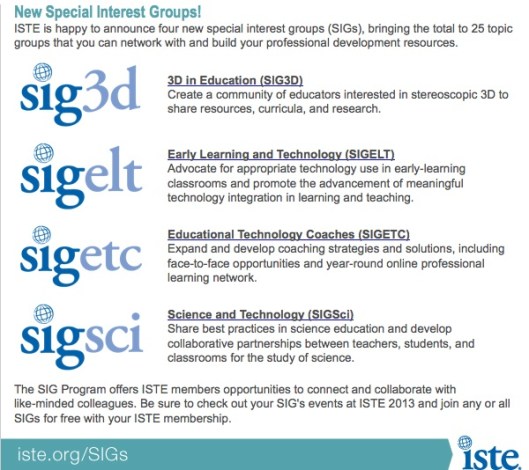
Iste is offering four new Special Interest Groups. These include a 3-D group focusing on visual technologies, Early Learning Technologies bent toward the increasing demand for technology tools in the Pre-K, Educational Technology Coaches to allow for greater collaboration within the field for greater development and understanding of technology tools in education, and Science and Technology to build upon the growing demand for STEM development and application in schools.
Each of these SIGs will, doubtless, return a wealth of knowledge and depth of understanding that will readily flow to faculty and staff close to the educators taking part.
Enjoy!
 Ozolnieks